| REQUIREMENTS |
| Permission |
Operation administrator and higher |
| Connectivity |
Online |
This document describes how to create an operation PWL in the infoex system.
Background
An Operation PWL is a locally defined snowpack layer. The dating, description and name of the PWL is specific to a single operation.
The following information assumes you are logged in to the InfoEx application and you have selected an operation (if you have more than one valid operation).
Step-by-step description
| 1.
|
Activate the PWL menu from the main infoEx menu.
|
| 2.
|
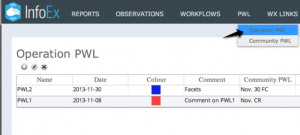 Fig. 1: Creating an Operation PWL |
| 3.
|
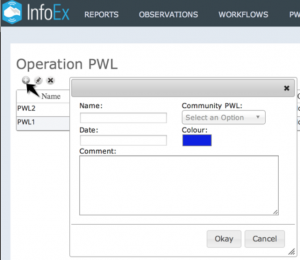 Fig. 2: Operation PWL settings  beneath the 'Operation PWL' title. This will open a popup window where you can provide the baseline information for your Operation PWL. beneath the 'Operation PWL' title. This will open a popup window where you can provide the baseline information for your Operation PWL.
|
| 4.
|
Provide the following information for your Operation PWL (see Fig. 2)
| Name:
|
Provide a meaningful name for your Operation PWL.
|
| Date:
|
Provide the date that your Operation PWL was buried.
|
| Comment:
|
Provide a descriptive comment for your community PWL, if desired.
|
| Community PWL:
|
You may link your Operation PWL to a Community PWL (see: Community PWLs)
| NOTE |
Linking your Operation PWL to a Community PWL allows you to retain your local definition and description of the PWL while allowing it to be linked with the same PWL observed in other infoEx operations |
|
| Colour:
|
Provide a colour that will identify your PWL in hazard assessments.
|
|
 beneath the 'Operation PWL' title. This will open a popup window where you can provide the baseline information for your Operation PWL.


